 Screenshot 1 of 2
HUD
Update Mixer SFX Deadlock
Author: Mafrazx
- Downloads
- 894
- Likes
- 7
- Updated
- October 15, 2026
Install with Mod Manager
GameBanana pageOpens Deadlock Mod Manager: it downloads the file from GameBanana and enables the mod.
No app yet? Download Deadlock Mod Manager
Description
From the author, in the original language.
==============================================================
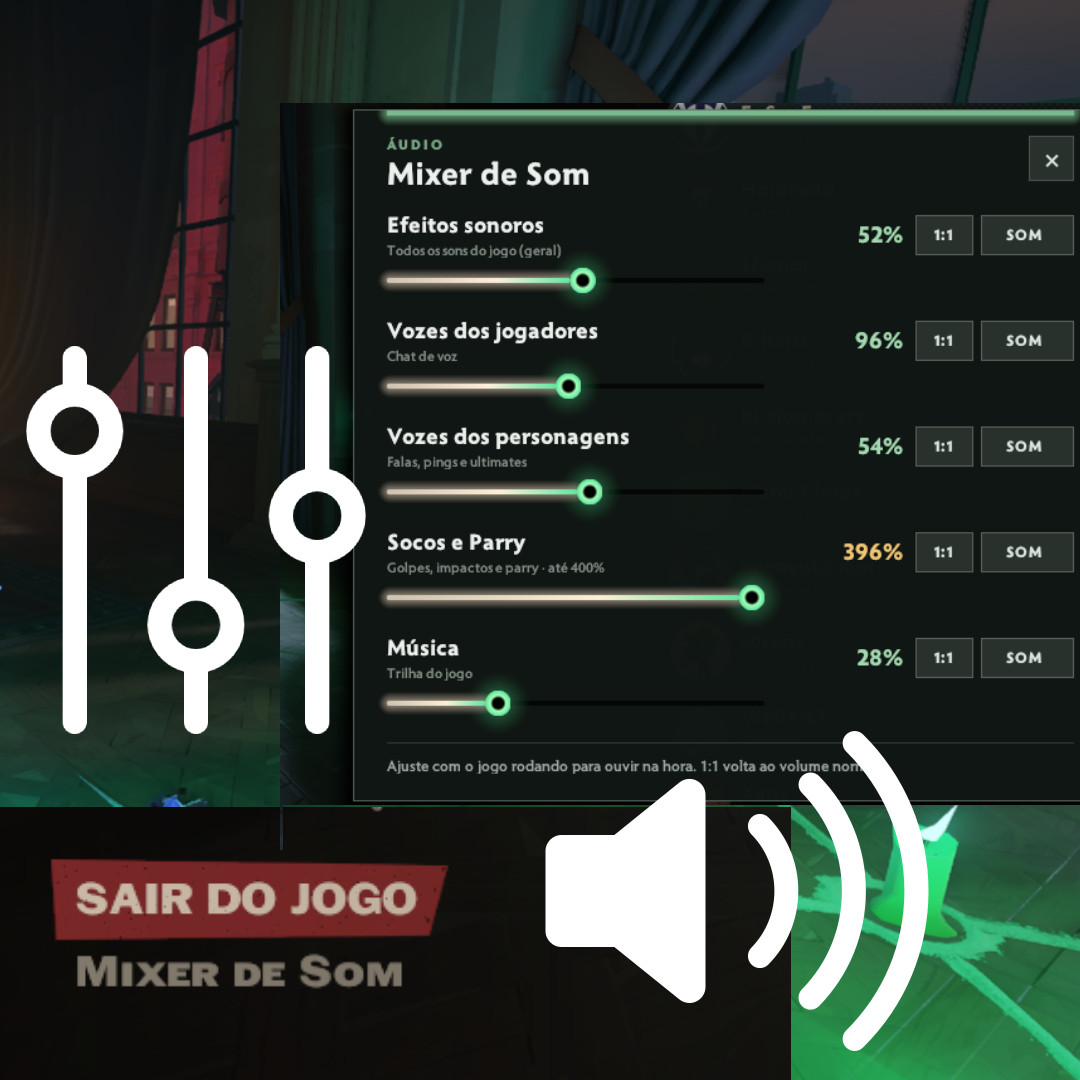
The game's audio settings are limited. This mod adds a "Sound Mixer" button to the Esc menu, with separate sliders so you control exactly what you hear during a match.
• Sound Effects — overall game volume (0–100%)
• Player Voices — voice chat (0–200%)
• Hero Voices — hero voice lines, pings and ultimates (0–100%)
• Melee & Parry — melee hits, impacts and parry from heroes and NPCs (0–400%)
• Music — game music (0–100%)
• Boost melee and parry sounds up to 4x without making the rest of the game louder
• Lower or mute hero voice lines without losing the other sounds
• MUTE button and 1:1 button (back to normal volume) on every slider
• Adjust mid-match and hear the change instantly
• Values are saved between sessions
• Compatible with FOV Slider and QOL Lock: the Sound Mixer does not replace the Esc menu file, all buttons show up and only one panel is open at a time
1. Extract the archive and copy "pak80_dir.vpk" to:
Steam\steamapps\common\Deadlock\game\citadel\addons\
2. The game must be set up for mods ("Game citadel/addons" line in gameinfo.gi). If you already use other mods or a mod manager, this is already done.
3. In a match (or the Hideout), press Esc and click "Sound Mixer".
To uninstall, delete "pak80_dir.vpk" from the addons folder.
==============================================================
==============================================================
As configurações de áudio do jogo são limitadas. Este mod adiciona um botão "Sound Mixer" no menu Esc, com barras separadas para controlar exatamente o que você quer ouvir durante a partida.
• Sound Effects — volume geral do jogo (0–100%)
• Player Voices — chat de voz (0–200%)
• Hero Voices — falas, pings e ultimates dos heróis (0–100%)
• Melee & Parry — socos, impactos e parry de heróis e NPCs (0–400%)
• Music — música do jogo (0–100%)
• Aumente os sons de soco e parry até 4x, sem aumentar o resto do jogo
• Abaixe ou silencie as falas dos heróis sem perder os outros sons
• Botão MUTE e botão 1:1 (volta ao volume normal) em cada barra
• Ajuste com a partida rolando e ouça a diferença na hora
• Os valores ficam salvos entre sessões
• Compatível com FOV Slider e QOL Lock: o Sound Mixer não substitui o arquivo do menu Esc, todos os botões aparecem e só um painel fica aberto por vez
1. Extraia o arquivo e copie "pak80_dir.vpk" para:
Steam\steamapps\common\Deadlock\game\citadel\addons\
2. O jogo precisa estar liberado para mods (linha "Game citadel/addons" no gameinfo.gi). Se você já usa outros mods ou um gerenciador de mods, isso já está feito.
3. Numa partida (ou no Hideout), aperte Esc e clique em "Sound Mixer".
Para desinstalar, apague "pak80_dir.vpk" da pasta addons.
SOUND MIXER / MIXER DE SOM - Deadlock
==============================================================SOUND MIXER — Control each type of Deadlock sound separately
The game's audio settings are limited. This mod adds a "Sound Mixer" button to the Esc menu, with separate sliders so you control exactly what you hear during a match.
- VOLUME SLIDERS
• Sound Effects — overall game volume (0–100%)
• Player Voices — voice chat (0–200%)
• Hero Voices — hero voice lines, pings and ultimates (0–100%)
• Melee & Parry — melee hits, impacts and parry from heroes and NPCs (0–400%)
• Music — game music (0–100%)
FEATURES
• Boost melee and parry sounds up to 4x without making the rest of the game louder
• Lower or mute hero voice lines without losing the other sounds
• MUTE button and 1:1 button (back to normal volume) on every slider
• Adjust mid-match and hear the change instantly
• Values are saved between sessions
• Compatible with FOV Slider and QOL Lock: the Sound Mixer does not replace the Esc menu file, all buttons show up and only one panel is open at a time
INSTALLATION
1. Extract the archive and copy "pak80_dir.vpk" to:
Steam\steamapps\common\Deadlock\game\citadel\addons\
2. The game must be set up for mods ("Game citadel/addons" line in gameinfo.gi). If you already use other mods or a mod manager, this is already done.
3. In a match (or the Hideout), press Esc and click "Sound Mixer".
To uninstall, delete "pak80_dir.vpk" from the addons folder.
==============================================================
SOUND MIXER — Controle cada tipo de som do Deadlock separadamente
==============================================================
As configurações de áudio do jogo são limitadas. Este mod adiciona um botão "Sound Mixer" no menu Esc, com barras separadas para controlar exatamente o que você quer ouvir durante a partida.
BARRAS DE VOLUME
• Sound Effects — volume geral do jogo (0–100%)
• Player Voices — chat de voz (0–200%)
• Hero Voices — falas, pings e ultimates dos heróis (0–100%)
• Melee & Parry — socos, impactos e parry de heróis e NPCs (0–400%)
• Music — música do jogo (0–100%)
RECURSOS
• Aumente os sons de soco e parry até 4x, sem aumentar o resto do jogo
• Abaixe ou silencie as falas dos heróis sem perder os outros sons
• Botão MUTE e botão 1:1 (volta ao volume normal) em cada barra
• Ajuste com a partida rolando e ouça a diferença na hora
• Os valores ficam salvos entre sessões
• Compatível com FOV Slider e QOL Lock: o Sound Mixer não substitui o arquivo do menu Esc, todos os botões aparecem e só um painel fica aberto por vez
INSTALAÇÃO
1. Extraia o arquivo e copie "pak80_dir.vpk" para:
Steam\steamapps\common\Deadlock\game\citadel\addons\
2. O jogo precisa estar liberado para mods (linha "Game citadel/addons" no gameinfo.gi). Se você já usa outros mods ou um gerenciador de mods, isso já está feito.
3. Numa partida (ou no Hideout), aperte Esc e clique em "Sound Mixer".
Para desinstalar, apague "pak80_dir.vpk" da pasta addons.
Similar mods
HUD
Health Color
HUD
MapList
The mod is its author's work; files and previews live on GameBanana, catalog data comes from Deadlock Mod Manager. If you are the author and want it removed, message us. Contacts
New skin - now the rank
The free tracker shows which heroes cost you points. Don't want to spend the season grinding? Price a boost.