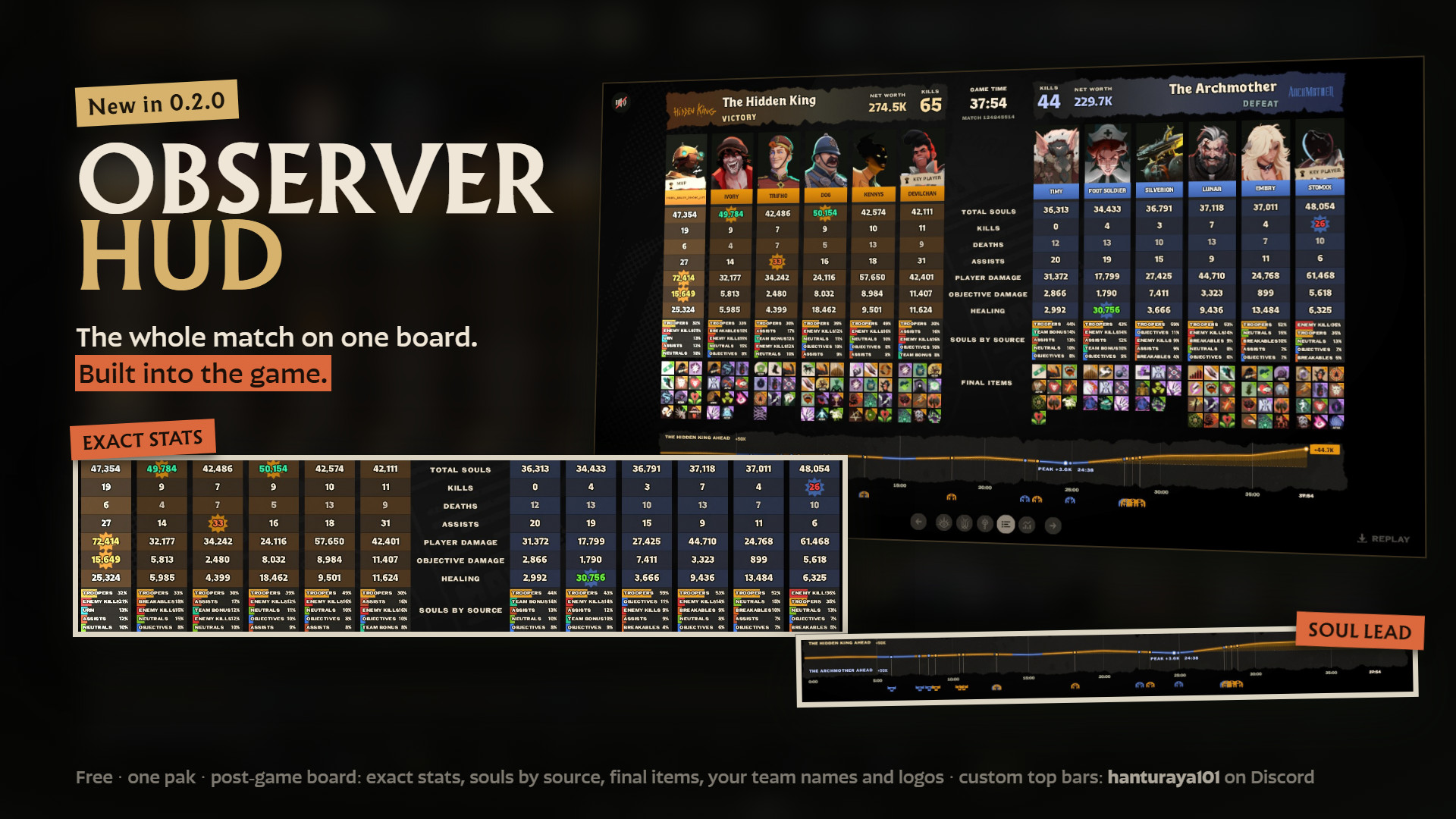
 Screenshot 1 of 7
HUD
Observer Hud
Author: Hanturaya
- Downloads
- 103
- Likes
- 5
- Updated
- October 26, 2026
Install with Mod Manager
GameBanana pageOpens Deadlock Mod Manager: it downloads the file from GameBanana and enables the mod.
No app yet? Download Deadlock Mod Manager
Description
From the author, in the original language.
[Twitch] | [Twitter] | [Support]
Observer HUD is a spectator HUD for community Deadlock tournaments. Under each player on the top bar it shows the crowd control on them with the seconds left, which a spectator normally can't see. It also shows purchases, ultimate cooldowns and objective timers, and puts your event, teams, logos, bans and series score on the stock top bar. You set it all up in game from the Escape menu.
For observer PCs only. The pak includes modified ability data so the status column works in spectator mode. Don't play matches with it installed: take it out of the addons folder before you queue.
Status column
The seconds left on each player's ultimate, right under its icon on the top bar. Nothing shows while it's ready.
Purchase notices (original feature by bytenode, rewritten for this mod)
Amber's soul lead over Sapphire across the match, with a pin every 5 minutes (or 1, 2, 3 or 10). By default it pops up for 30 seconds at each new pin. You can keep it on or turn it off, and change its size and position. The history starts when you start watching.
Two top bar looks
Give players a display name. While you spectate, it replaces their in-game name in the top bar's names row, on their healthbar, on the off-screen hero markers and in the kill feed.
Series score
Set the wins by hand. When the end screen of a game you're spectating names a winner, that team gets +1 automatically (once per map, never past what the format needs).
Setup
Observer HUD is a spectator HUD for community Deadlock tournaments. Under each player on the top bar it shows the crowd control on them with the seconds left, which a spectator normally can't see. It also shows purchases, ultimate cooldowns and objective timers, and puts your event, teams, logos, bans and series score on the stock top bar. You set it all up in game from the Escape menu.
For observer PCs only. The pak includes modified ability data so the status column works in spectator mode. Don't play matches with it installed: take it out of the addons folder before you queue.
Status column
- Up to six status icons under every top-bar portrait, two per row, each with its seconds left.
- Each icon has the colour of the team that applied it. Stuns get a stun mark.
- Covers 34 abilities from 32 heroes (list further down), plus getting knocked off a zipline.
- Djinn's Mark shows from 8 stacks. Celeste's Shining Wonder pulses once each time the orb bounces on that hero.
The seconds left on each player's ultimate, right under its icon on the top bar. Nothing shows while it's ready.
Purchase notices (original feature by bytenode, rewritten for this mod)
- When a player buys an item, a small item card with its icon and name pops up under their portrait.
- Newest on top, three at most. Each one stays for 3, 5, 8 or 15 seconds (5 by default), or you can turn them off.
- Joining a game halfway or skipping through a demo doesn't flood the bar with old purchases.
- Item icons work with the English shop names. In other game languages the notice shows the name only.
- Rewritten from the version in the DLF Observer Mod. It reads the game's own recent-purchases list instead of replacing the shop layout, so shop mods can stay installed. While you're not spectating it only checks every 2 seconds whether you are; while you spectate it checks the list twice a second.
- Small chips under the clock that only show when an objective is close: bridge buff, urn, rift, mid-boss respawn, and the time left on a held rejuvenator in the holder's team colour.
- The rift counts down from its 20 second warning, then shows LIVE while it's open. The game doesn't send the rift time any earlier.
- Per timer, choose how early it shows: 15, 30, 60 or 120 seconds, always, or off. The rift is just on or off.
- The stock objective health bars and rift meter move under the timers so nothing overlaps.
Amber's soul lead over Sapphire across the match, with a pin every 5 minutes (or 1, 2, 3 or 10). By default it pops up for 30 seconds at each new pin. You can keep it on or turn it off, and change its size and position. The history starts when you start watching.
Two top bar looks
- Base Game+ Names (default) looks like the stock bar. Each team gets a plate with its name, logo and a stage/format line, and the player names sit in a row above the cards. The organiser logo or name sits in the centre between the series wins, and each team's two bans sit beside the clock.
- Night Desk is a dark band across the top. Event, stage and format sit on the left, game number and "first to" on the right. Each team gets its name, player names and bans, the logos sit in an arch by the centre with the series score, and you can add an info card (for example a prize pool).
Give players a display name. While you spectate, it replaces their in-game name in the top bar's names row, on their healthbar, on the off-screen hero markers and in the kill feed.
Series score
Set the wins by hand. When the end screen of a game you're spectating names a winner, that team gets +1 automatically (once per map, never past what the format needs).
Setup
- Open the Escape menu and click TOURNAMENT SETUP. The button only shows while you're spectating.
- Pages: MATCH, TEAMS, PLAYERS, TOP BAR, NIGHT DESK, TIMERS, SHARE. Changes apply as you type.
- Logos: paste an image URL. PNG, JPG and GIF work, and so do imgur, Giphy and Tenor links.
- Your setup is saved on this PC and comes back after a restart. SHARE gives you a code that copies the whole setup onto another observer PC.
- Saving goes through a small page on hantu-raya.github.io, loaded in Steam's built-in browser. If the page can't be reached, the editor says OFFLINE - SESSION ONLY and your settings last until you close the game.
- The SPECTATING name and the camera key hints are hidden. The keys still work.
- The pause screen becomes a small II box that shows the unpause countdown.
- The kill feed moves down when it would cover the first player's statuses.
- Extract pak10_dir.vpk from the archive into ...\steamapps\common\Deadlock\game\citadel\addons (create the addons folder if it's missing).
- Your game\citadel\gameinfo.gi must load the addons folder (the line Game citadel/addons above Game citadel). If your other GameBanana mods work, it already does.
- Fully restart Deadlock, spectate a match or play a demo, then open Escape and click TOURNAMENT SETUP.
- If another mod already uses pak10_dir.vpk, rename this one to a free number.
- It doesn't replace the top bar, Escape menu or healthbar layouts, so mods that do (HP Colors, ShowRank, QOL Lock, Top Bar Plus) can stay installed.
- Don't use it together with the DLF Observer Mod. Both draw a band over the top bar.
- Mods that ship their own ability data (abilities.vdata_c or modifiers.vdata_c) in a lower-numbered pak take over those files. The status column then shows only what the game itself draws.
- When Bebop hooks someone, the hooked player isn't pulled toward Bebop on the observer's screen. It's a side effect of making the hook show in the column. Players in the match aren't affected.
- Ability data changes with Deadlock patches. I update the mod after each patch; until then, some statuses may be missing.
- Tested at 1920x1080 and 1600x900. Ultrawide and 4:3 haven't been tested yet.
- Abrams: Seismic Impact
- Baba: Feed The Birds (with stack count)
- Bebop: Grapple Arm
- Billy: Chain Gang (during the pull)
- Celeste: Shining Wonder
- Deadman Danny: Close The Deal
- The Doorman: Hotel Guest, Luggage Cart
- Drifter: Eternal Night
- Dynamo: Singularity
- Grey Talon: Guided Owl
- Haze: Sleep Dagger
- Holliday: Spirit Lasso
- Infernus: Concussive Combustion
- Kelvin: Frozen Shelter
- Lady Geist: Soul Exchange
- Lash: Death Slam
- Mirage: Djinn's Mark (from 8 stacks)
- Mo & Krill: Combo
- Nurse Harrow: Lurking Terrors
- Paige: Rallying Charge
- Paradox: Paradoxical Swap
- Pocket: Affliction
- Rem: Naptime
- Sinclair: Rabbit Hex
- Solomon: Develop Queen, Rook Battery
- Victor: Shocking Reanimation
- Violet: Abstract Landscape
- Viscous: The Cube
- Vyper: Petrifying Bola
- Warden: Binding Word
- Wraith: Telekinesis
- Yamato: Flying Slash
- Any hero: knocked off a zipline
Similar mods
HUD
Health Color
HUD
MapList
The mod is its author's work; files and previews live on GameBanana, catalog data comes from Deadlock Mod Manager. If you are the author and want it removed, message us. Contacts
New skin - now the rank
The free tracker shows which heroes cost you points. Don't want to spend the season grinding? Price a boost.