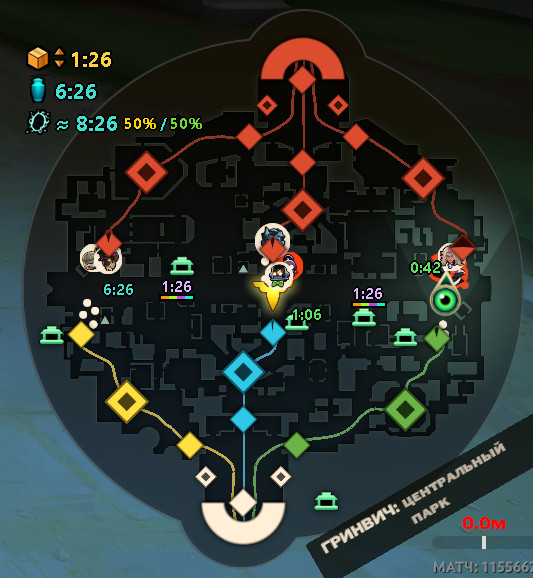
 Screenshot 1 of 2
HUD
MapTimer 0.1 alpha
Author: nonxd
- Downloads
- 7
- Likes
- 0
- Updated
- October 12, 2026
GameBanana did not return a file for one-click install. Download the mod on its page and install it by hand.
No app yet? Download Deadlock Mod Manager
Description
From the author, in the original language.
MapTimer — timers on the Deadlock minimap [0.1 alpha]
⚠️ ALPHA TEST
This is an early test version: bugs and wrong timers can happen, especially right after a Deadlock update. MapTimer checks the game files at every start and adapts by itself where it can, and tells you when it can't. If something goes wrong, please report it (see Support). Thanks for testing!
⚠️ MANUAL INSTALL ONLY
MapTimer is not a .vpk mod, so Deadlock Mod Manager and 1-Click Install can't install it. Download the zip and follow the steps below.
WHAT YOU SEE ON YOUR MINIMAP
The timers hide by themselves in the ESC menu, the shop, the hideout and outside matches, and stand still while the game is paused.
REQUIREMENTS
INSTALL (once)
"D:\SteamLibrary\steamapps\common\Deadlock\MapTimer\MapTimer.bat" %command%
UPDATE
Download the new version and double-click its MapTimer.bat once: it replaces the installed copy. Nothing to change in Steam.
UNINSTALL
SUPPORT: problems, bugs, ideas
Write to nxnxd and attach MapTimer_log.txt (it is next to MapTimer.bat; press L in the MapTimer window to show it) with a short description of what happened. For screenshots with the timers use Win+Shift+S: Steam F12 and the Game Bar capture only the game.
If Windows or your antivirus warns about the file, please send us a screenshot of the warning.
HOW IT WORKS
MapTimer.bat is a plain-text script: you can open it in Notepad and read every line. At every start it builds a small HUD module (addons\pakNN_dir.vpk) from your own game files, starts the game with -con_logfile console.log, reads that log and draws the timers in a transparent, click-through window over the minimap. It does not read or change the game's memory and sends no input to the game. If another mod changes the same HUD file, MapTimer combines both or tells you. The MapTimer window speaks all 29 languages of the game.
CREDITS AND LICENSE
- Author: nxnxd
- Developed with the assistance of Claude, an AI assistant by Anthropic
- MIT License: the full text is at the top of MapTimer.bat
- Deadlock, its map art, HUD files and texts belong to Valve. The map icons are derived from the game's minimap art and the rift phrases come from its localization. MapTimer is an unofficial fan-made tool, not affiliated with or endorsed by Valve. Use it at your own risk.
⚠️ ALPHA TEST
This is an early test version: bugs and wrong timers can happen, especially right after a Deadlock update. MapTimer checks the game files at every start and adapts by itself where it can, and tells you when it can't. If something goes wrong, please report it (see Support). Thanks for testing!
⚠️ MANUAL INSTALL ONLY
MapTimer is not a .vpk mod, so Deadlock Mod Manager and 1-Click Install can't install it. Download the zip and follow the steps below.
WHAT YOU SEE ON YOUR MINIMAP
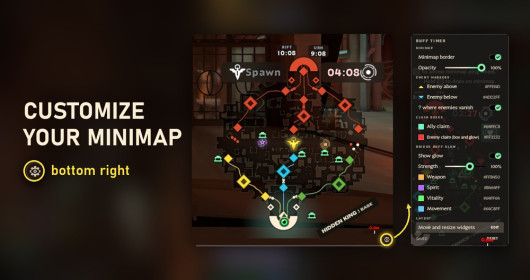
- Neutral camps: respawn timers for every camp and Sinner's Sacrifice, coloured by tier, plus a countdown in the minute before they first appear.
- Mid Boss: respawn timer; the last minute turns from yellow to red.
- Power-ups (runes): time to the next wave on both spots, with a bar of the kinds that can come: 2 colours when MapTimer knows them, 4 when it doesn't.
- Soul Urn: when and on which side the next one spawns; after a pickup, a red countdown until it's gone.
- Rift: exact time during its 20-second warning; before that, the next window and the chance for each lane (York / Greenwich). A teammate's rift ping or chat message, in any game language, makes it 100%.
- Breakable crates: their first spawns at 3:00, 5:00 and 10:00.
The timers hide by themselves in the ESC menu, the shop, the hideout and outside matches, and stand still while the game is paused.
REQUIREMENTS
- Windows 10 or 11, the Steam version of Deadlock
- Settings → Video → Window mode: Borderless Window. In Full Screen, Windows shows no other window over the game, so the timers can't be seen.
INSTALL (once)
- 1. Download the zip and unpack it anywhere, e.g. to Downloads.
- 2. Close Deadlock and double-click MapTimer.bat. It installs itself into your Deadlock folder (Deadlock\MapTimer), switches mods on in gameinfo.gi (a backup is saved) and builds its HUD part from your own game files.
- 3. The window shows the Steam launch option and copies it for you. In Steam: Library → right-click Deadlock → Properties → General → Launch Options → paste it (Ctrl+V). It looks like this (your path will differ):
"D:\SteamLibrary\steamapps\common\Deadlock\MapTimer\MapTimer.bat" %command%
- 4. In Deadlock: Settings → Video → Window mode → Borderless Window.
- 5. Start Deadlock from Steam as usual. A small MapTimer window opens with the game: keep it open (minimizing is fine). The timers appear on your minimap when a match starts.
UPDATE
Download the new version and double-click its MapTimer.bat once: it replaces the installed copy. Nothing to change in Steam.
UNINSTALL
- 1. Open the folder Deadlock\MapTimer, type cmd in the Explorer address bar, press Enter and run: MapTimer.bat uninstall
- 2. Remove the MapTimer line from Deadlock's launch options in Steam and delete the MapTimer folder.
SUPPORT: problems, bugs, ideas
Write to nxnxd and attach MapTimer_log.txt (it is next to MapTimer.bat; press L in the MapTimer window to show it) with a short description of what happened. For screenshots with the timers use Win+Shift+S: Steam F12 and the Game Bar capture only the game.
- Steam: https://steamcommunity.com/id/nxnxd/
- Discord: https://discord.gg/c4GEhbe
If Windows or your antivirus warns about the file, please send us a screenshot of the warning.
HOW IT WORKS
MapTimer.bat is a plain-text script: you can open it in Notepad and read every line. At every start it builds a small HUD module (addons\pakNN_dir.vpk) from your own game files, starts the game with -con_logfile console.log, reads that log and draws the timers in a transparent, click-through window over the minimap. It does not read or change the game's memory and sends no input to the game. If another mod changes the same HUD file, MapTimer combines both or tells you. The MapTimer window speaks all 29 languages of the game.
CREDITS AND LICENSE
- Author: nxnxd
- Developed with the assistance of Claude, an AI assistant by Anthropic
- MIT License: the full text is at the top of MapTimer.bat
- Deadlock, its map art, HUD files and texts belong to Valve. The map icons are derived from the game's minimap art and the rift phrases come from its localization. MapTimer is an unofficial fan-made tool, not affiliated with or endorsed by Valve. Use it at your own risk.
Similar mods


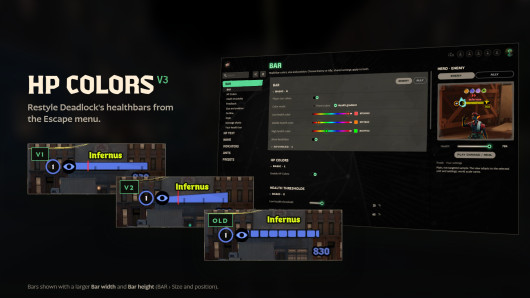
HUD
Health Color
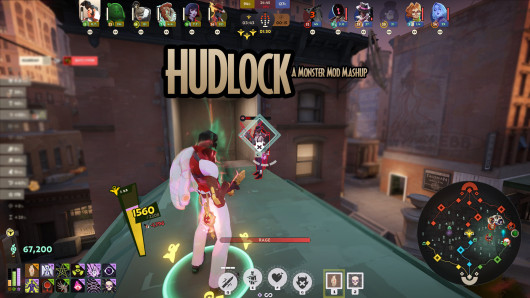
HUD
MapList
The mod is its author's work; files and previews live on GameBanana, catalog data comes from Deadlock Mod Manager. If you are the author and want it removed, message us. Contacts
New skin - now the rank
The free tracker shows which heroes cost you points. Don't want to spend the season grinding? Price a boost.