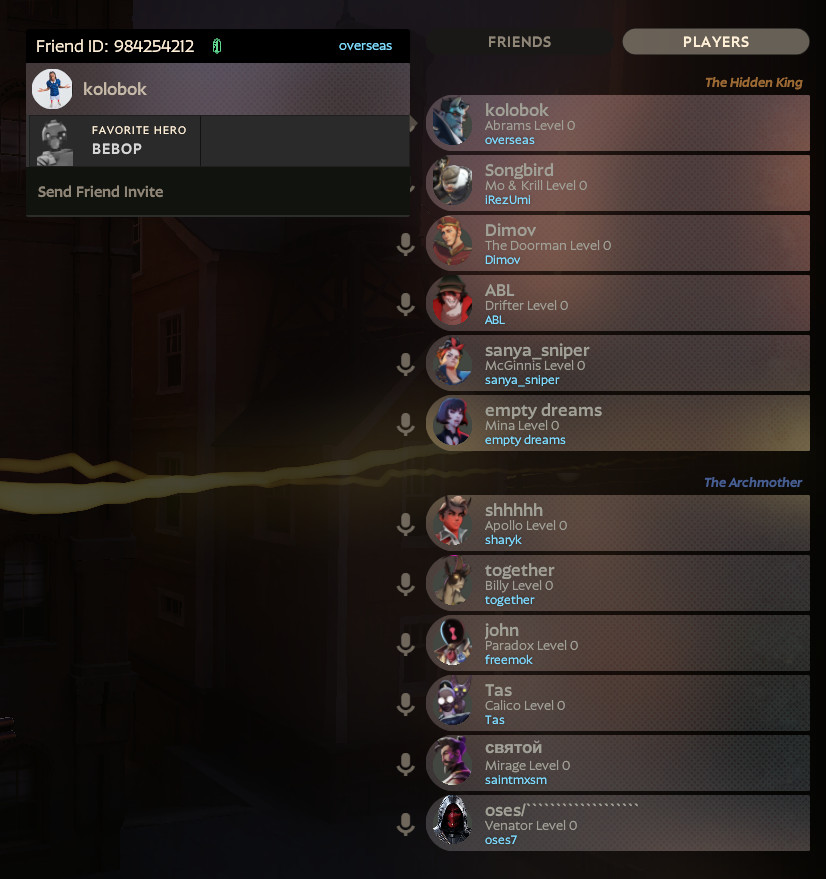
 Screenshot 1 of 7
HUD
SteamNotes
Author: turbozver
- Downloads
- 724
- Likes
- 5
- Updated
- October 23, 2026
Install with Mod Manager
GameBanana pageOpens Deadlock Mod Manager: it downloads the file from GameBanana and enables the mod.
No app yet? Download Deadlock Mod Manager
Description
From the author, in the original language.
SteamNotes is a mod that keeps player identities recognizable even when their in-game names change.
Download
- The main download is the clean Standalone build
- QOL Lock users must choose the separate QOL-compatible version and follow the instructions below
Features
- Shows saved nicknames in the ESC player list, mini-profiles, and result screens.
- Displays saved nicknames in the top bar, regardless of their current in-game names.
- Highlights builds created by saved accounts, making them easier to be identified.
- Right-click a player in the ESC player list or post-match results to edit their notes.
QOL Lock compatibility
Do not combine the standalone SteamNotes build with QOL Lock. Both modify overlapping Panorama UI files, so some interface features may break.- If you use QOL Lock, download the separate QOL-compatible version from the list.
- In order to load players in-match with QOL Lock, enable HUD > Show Player Ranks in QOL Lock settings.
- SteamNotes must load before QOL Lock and other UI mods. Use
pak01_dir.vpkfor SteamNotes andpak02_dir.vpkor later for the remaining UI mods.
SteamNotes Settings
You can open SteamNotes menu directly from the ESC menu. Top-bar appearance and build-author highlighting are optional and can be disabled independently.Related links
Similar mods
HUD
Health Color
HUD
MapList
The mod is its author's work; files and previews live on GameBanana, catalog data comes from Deadlock Mod Manager. If you are the author and want it removed, message us. Contacts
New skin - now the rank
The free tracker shows which heroes cost you points. Don't want to spend the season grinding? Price a boost.