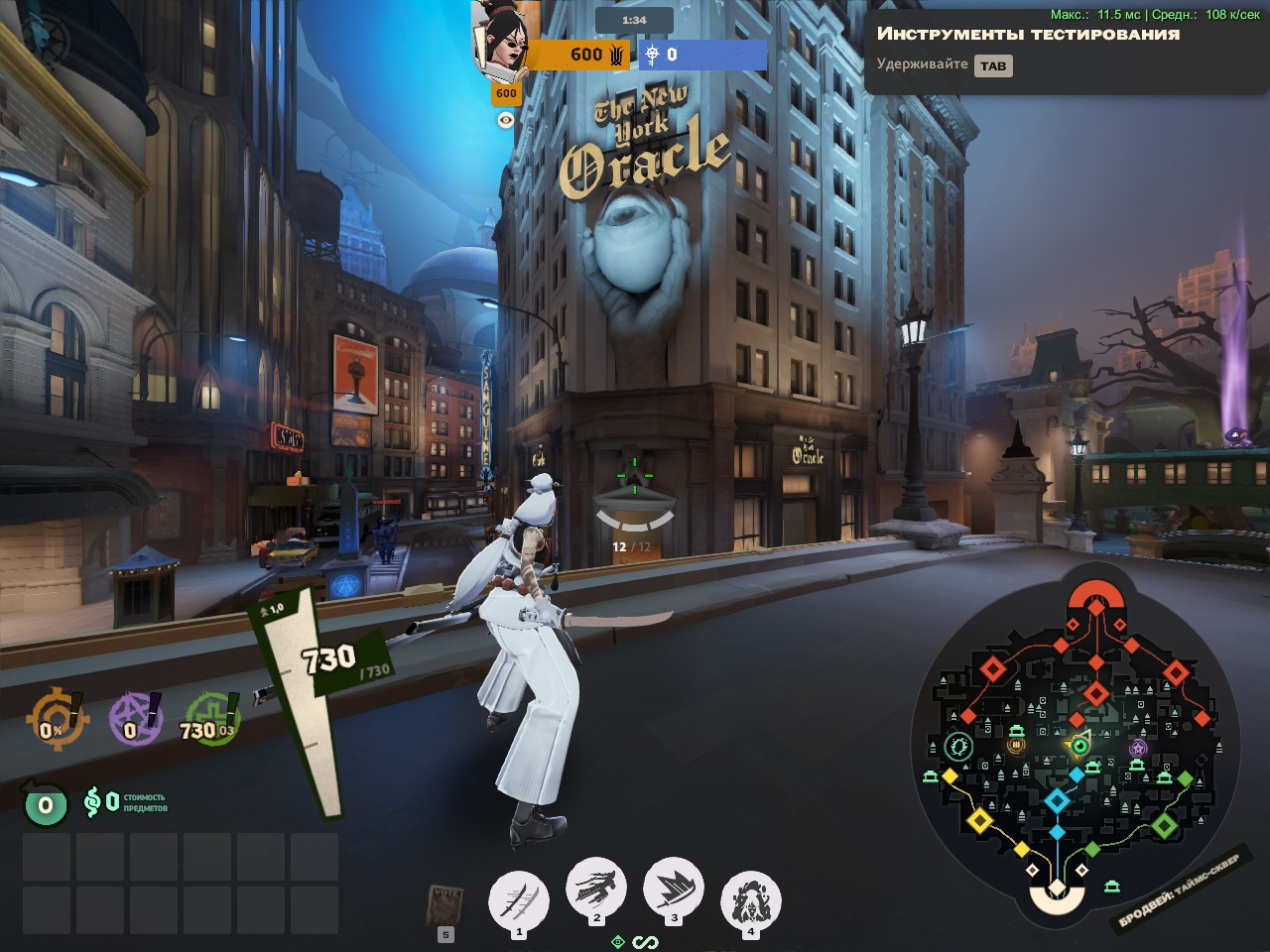
 Screenshot 1 of 2
HUD
4:3 HUD FIX by .extremoff
Author: extremoff
- Downloads
- 1,694
- Likes
- 1
- Updated
- 6 жовтня 2026
Install with Mod Manager
GameBanana pageOpens Deadlock Mod Manager: it downloads the file from GameBanana and enables the mod.
No app yet? Download Deadlock Mod Manager
Description
From the author, in the original language.
What it does
Repositions the health/abilities container closer to the center of the screen by reducing its side margins.
Useful if you play on a stretched/narrow resolution (e.g. 4:3 stretch) where the HP bar normally sits too far on the periphery, outside your comfortable field of view.
⚠️ Compatibility
This mod overrides panorama/styles/hud.vcss_c — the single shared stylesheet for the entire HUD. If you use another mod that also touches this file (HP bar recolors, ability icon resizing, minimap styling, etc.), only one of them will actually apply — whichever loads last. The game won't crash, but the other mod's changes will silently be ignored. Use only one HUD-styling mod at a time.
How to enable mod loading (gameinfo.gi) — detailed, first-time setup
If this is your first mod for Deadlock, you need to tell the game to look inside the addons folder. Do this once — after that, any future mod just goes straight into addons.
1. Go to your game folder: ...\Deadlock\game\citadel\
2. Find the file gameinfo.gi in that folder. Make a backup copy first — copy it and rename the copy to gameinfo.gi.bak (so you can undo this if something goes wrong).
3. Open gameinfo.gi with a plain text editor — Notepad works, but Notepad++ or VS Code is easier to read. Don't use Word.
4. Press Ctrl+F and search for the word SearchPaths. You'll find a block that looks like this:
SearchPaths
{
Game_UILanguage citadel_*LANGUAGE*
Game_LowViolence citadel_lv
Game citadel
Game core
}
(exact wording/spacing may differ slightly depending on your game version — that's fine, you're looking for the block with Game citadel and Game core lines)
5. Add three new lines right before Game citadel, so it looks like this:
SearchPaths
{
Game_UILanguage citadel_*LANGUAGE*
Game_LowViolence citadel_lv
Mod citadel
Write citadel
Game citadel/addons
Game citadel
Game core
}
The Mod citadel / Write citadel lines matter — without them, some versions of the game may start saving your keybinds/settings into the wrong folder. Don't skip them.
6. Save the file and close the editor.
7. Create a folder named addons inside game\citadel\ if it doesn't exist yet: game\citadel\addons\
8. Put the mod's .vpk file(s) straight into that addons folder.
9. Launch the game and check that the mod is working.
Repositions the health/abilities container closer to the center of the screen by reducing its side margins.
Useful if you play on a stretched/narrow resolution (e.g. 4:3 stretch) where the HP bar normally sits too far on the periphery, outside your comfortable field of view.
⚠️ Compatibility
This mod overrides panorama/styles/hud.vcss_c — the single shared stylesheet for the entire HUD. If you use another mod that also touches this file (HP bar recolors, ability icon resizing, minimap styling, etc.), only one of them will actually apply — whichever loads last. The game won't crash, but the other mod's changes will silently be ignored. Use only one HUD-styling mod at a time.
How to enable mod loading (gameinfo.gi) — detailed, first-time setup
If this is your first mod for Deadlock, you need to tell the game to look inside the addons folder. Do this once — after that, any future mod just goes straight into addons.
1. Go to your game folder: ...\Deadlock\game\citadel\
2. Find the file gameinfo.gi in that folder. Make a backup copy first — copy it and rename the copy to gameinfo.gi.bak (so you can undo this if something goes wrong).
3. Open gameinfo.gi with a plain text editor — Notepad works, but Notepad++ or VS Code is easier to read. Don't use Word.
4. Press Ctrl+F and search for the word SearchPaths. You'll find a block that looks like this:
SearchPaths
{
Game_UILanguage citadel_*LANGUAGE*
Game_LowViolence citadel_lv
Game citadel
Game core
}
(exact wording/spacing may differ slightly depending on your game version — that's fine, you're looking for the block with Game citadel and Game core lines)
5. Add three new lines right before Game citadel, so it looks like this:
SearchPaths
{
Game_UILanguage citadel_*LANGUAGE*
Game_LowViolence citadel_lv
Mod citadel
Write citadel
Game citadel/addons
Game citadel
Game core
}
The Mod citadel / Write citadel lines matter — without them, some versions of the game may start saving your keybinds/settings into the wrong folder. Don't skip them.
6. Save the file and close the editor.
7. Create a folder named addons inside game\citadel\ if it doesn't exist yet: game\citadel\addons\
8. Put the mod's .vpk file(s) straight into that addons folder.
9. Launch the game and check that the mod is working.
Similar mods
HUD
Health Color
HUD
MapList
The mod is its author's work; files and previews live on GameBanana, catalog data comes from Deadlock Mod Manager. If you are the author and want it removed, message us. Contacts
New skin - now the rank
The free tracker shows which heroes cost you points. Don't want to spend the season grinding? Price a boost.