 Screenshot 1 of 7
HUD
Hide Investments
Author: Mixboat
- Downloads
- 1,870
- Likes
- 4
- Updated
- 18 жовтня 2026
Install with Mod Manager
GameBanana pageOpens Deadlock Mod Manager: it downloads the file from GameBanana and enables the mod.
No app yet? Download Deadlock Mod Manager
Description
From the author, in the original language.
AI DISCLAIMER: this mod was made with AI assistance
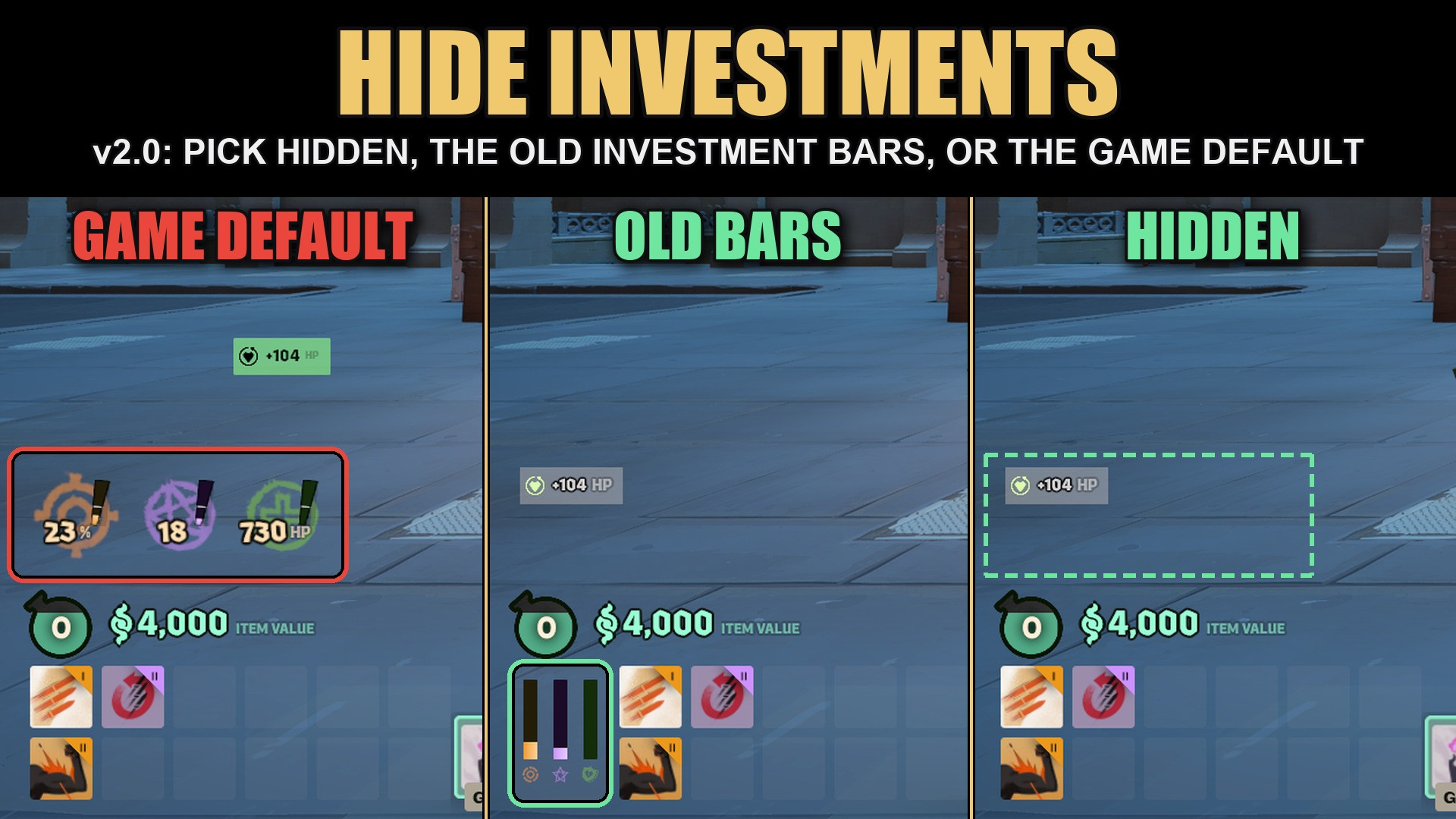
Pick how investments show in Settings > Game > Shop > Investment display:- Hidden: the Weapon, Spirit and Vitality investment badges (bottom left, next to your health) are gone.
- Old bars: badges hidden, and the old investment bars from before the 2026-09-29 shop update are back next to your item slots.
- Game default: the mod changes nothing.
The old investment bars
- Three thin bars next to your item slots, filled by the game itself.
- Hover an item in the shop: the matching bar previews where that item takes your investment, like before the update. No more buying, checking and selling.
- Hover a bar for the investment window with every tier, even before your first purchase.
- Quick Buy and its key hint move over so nothing overlaps.
- A white line on each bar marks the 4.8K investment tier.
Stat list
In Hidden and Old bars the stat list also gets its pre-investments look:- One vertical list on the left, grouped Weapon, then Spirit, then Vitality. No floating columns, no gaps.
- Boosted stats get the old faint highlight instead of the bright green box.
- The small round source icons on boosted stats are hidden.
Patch-resistant
No HUD layout or stylesheet is replaced (v2.0 dropped the stylesheet copy v1.1 shipped). The mod adds one script line each to three tiny layouts (only one has to load) and does everything else while the game runs. If Valve changes something, only that one feature stops; nothing can go stale or crash. The old bars are Valve's own panel, still in the game.Install
Grimoire / Deadlock Mod Manager: install and enable it.
Manual: rename the VPK to an unused pakXX_dir.vpk (e.g. pak50_dir.vpk) and put it in Deadlock\game\citadel\addons\
Notes
- Client side only: it only changes your own HUD.
- Conflicts with other mods that replace panorama/layout/team_status, panorama/layout/hud_data_feed or panorama/layout/hud_screen_effects_muted.
- Works alongside Wide FOV Slider, Old Damage Portraits and Shop Notes.
Similar mods
HUD
Health Color
HUD
MapList
The mod is its author's work; files and previews live on GameBanana, catalog data comes from Deadlock Mod Manager. If you are the author and want it removed, message us. Contacts
New skin - now the rank
The free tracker shows which heroes cost you points. Don't want to spend the season grinding? Price a boost.