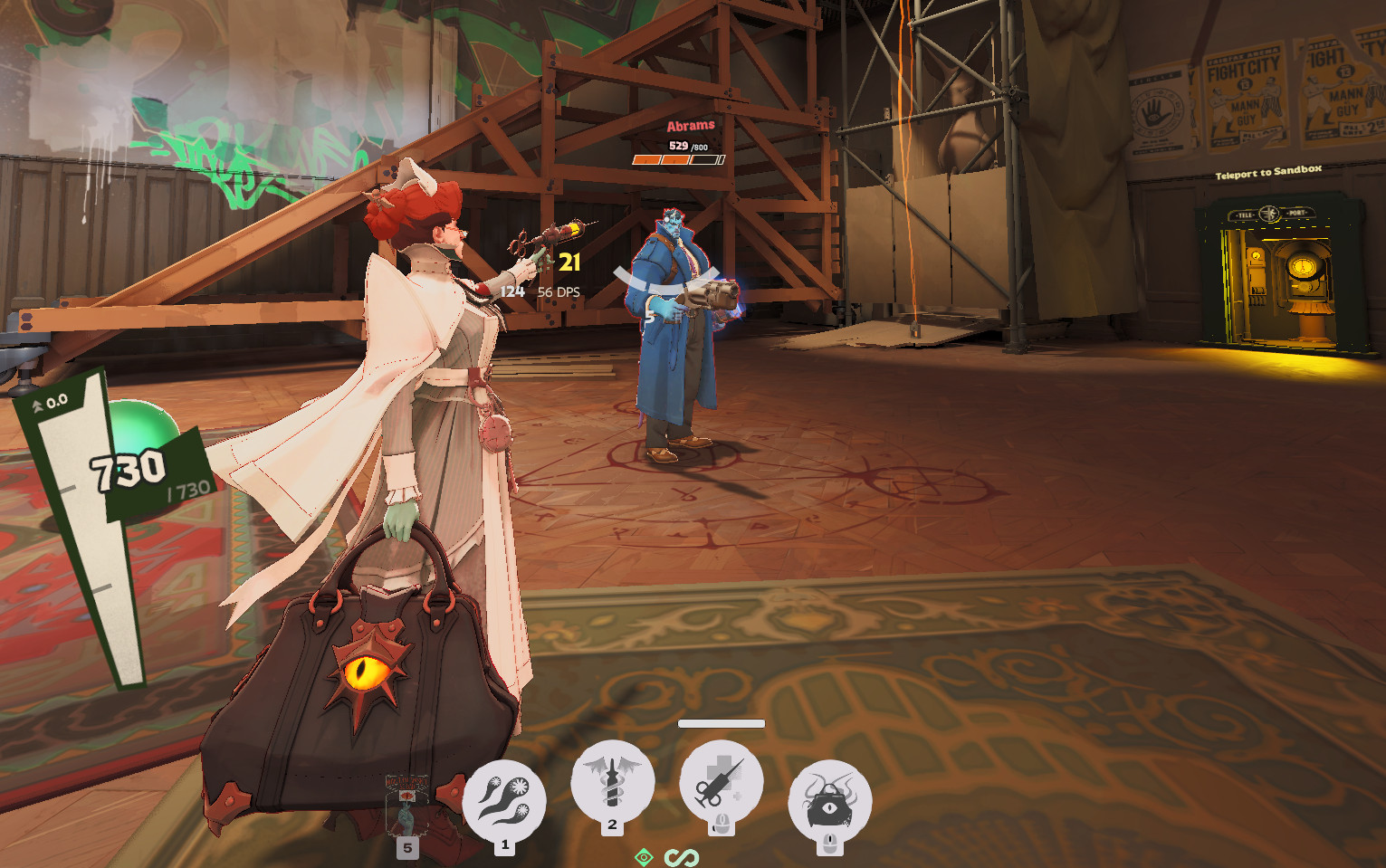
 Кадр 1 из 6
Интерфейс
Custom Healthbar/Hitmarkers/HUD
Автор: Elboof
- Загрузки
- 2 363
- Лайки
- 10
- Обновлён
- 25 октября 2026
Установить через Mod Manager
Страница на GameBananaОткроет Deadlock Mod Manager: он скачает файл с GameBanana и включит мод.
Нет приложения? Скачать Deadlock Mod Manager
Описание
От автора, на языке оригинала.
Installing
Download hud_v351.zip, or 1-click install it with your mod manager. That's all you need.
By hand: unzip it and put pak47_dir.vpk in Deadlock\game\citadel\addons. If there's already a pak47_dir.vpk in there, rename this one to any unused number (pak48_dir.vpk etc). If you had an older version installed, remove it first so you aren't running two copies.
Changing the settings (optional)
What it does
It should work alongside QOL Lock. I tried to keep it in theme with the game as best i could, but im not an artist.
Download hud_v351.zip, or 1-click install it with your mod manager. That's all you need.
By hand: unzip it and put pak47_dir.vpk in Deadlock\game\citadel\addons. If there's already a pak47_dir.vpk in there, rename this one to any unused number (pak48_dir.vpk etc). If you had an older version installed, remove it first so you aren't running two copies.
Changing the settings (optional)
- Download hud_feedback_settings_v351.zip and unzip it anywhere. It's a program, not a mod, so don't put it in addons or 1-click install it. On Linux, get hud_feedback_settings_linux_v351.zip and run launch-linux.sh (needs Python 3).
- Close Deadlock.
- Open HUD Feedback Settings.exe, change what you want (there's a preview you can drag things around in) and click Apply.
What it does
- Health bars split into 250 or 100 HP segments on every unit, in four styles: stacked, grid, single and League.
- Current/max HP above heroes, objectives and camps (it follows the game's Show Health Values setting), with bullet shield HP next to it.
- Hits flash the bar, show the damage you just did in white, break off emptied segments and give the bar a little jolt.
- A smaller hitmarker with a bounce on every hit. Crits stay yellow.
- The floating damage numbers are replaced by a readout by your crosshair: your last hit, your total this fight, and your DPS.
It should work alongside QOL Lock. I tried to keep it in theme with the game as best i could, but im not an artist.
Похожие моды
Интерфейс
DEADLOCK TOASTED
Интерфейс
Catlock: Kitty Hero Portraits
Интерфейс
Health Color
Интерфейс
Jumpscare Mod
Интерфейс
Mid and Bridge Buff Timer
Интерфейс
FG Healthbar Revamp
Интерфейс
MapList
Мод — работа автора, файлы и превью лежат на GameBanana, данные каталога — Deadlock Mod Manager. Автор хочет убрать мод отсюда — напиши нам, уберём. Контакты
Скин поменял — теперь ранг
Трекер бесплатно покажет, на каких героях ты теряешь очки. Не хочешь тратить сезон — посчитай буст.