 Кадр 1 из 4
Интерфейс
Strafer - Learn Air Strafing
Автор: TharinEvra
- Загрузки
- 6 211
- Лайки
- 9
- Обновлён
- 9 октября 2026
Установить через Mod Manager
Страница на GameBananaОткроет Deadlock Mod Manager: он скачает файл с GameBanana и включит мод.
Нет приложения? Скачать Deadlock Mod Manager
Описание
От автора, на языке оригинала.
AI disclosure: Strafer's code was written with the help of Claude, Anthropic's AI assistant (https://claude.ai), and tested in game by me.
Please, turn on in-game speedometer for the mod to work as intended. You also need to be on NYC map for the mod to work, as it uses your minimap.
Showcase video explains how to use it properly. Or hit me in DMs in Discord @tharin - I'll be happy to explain.
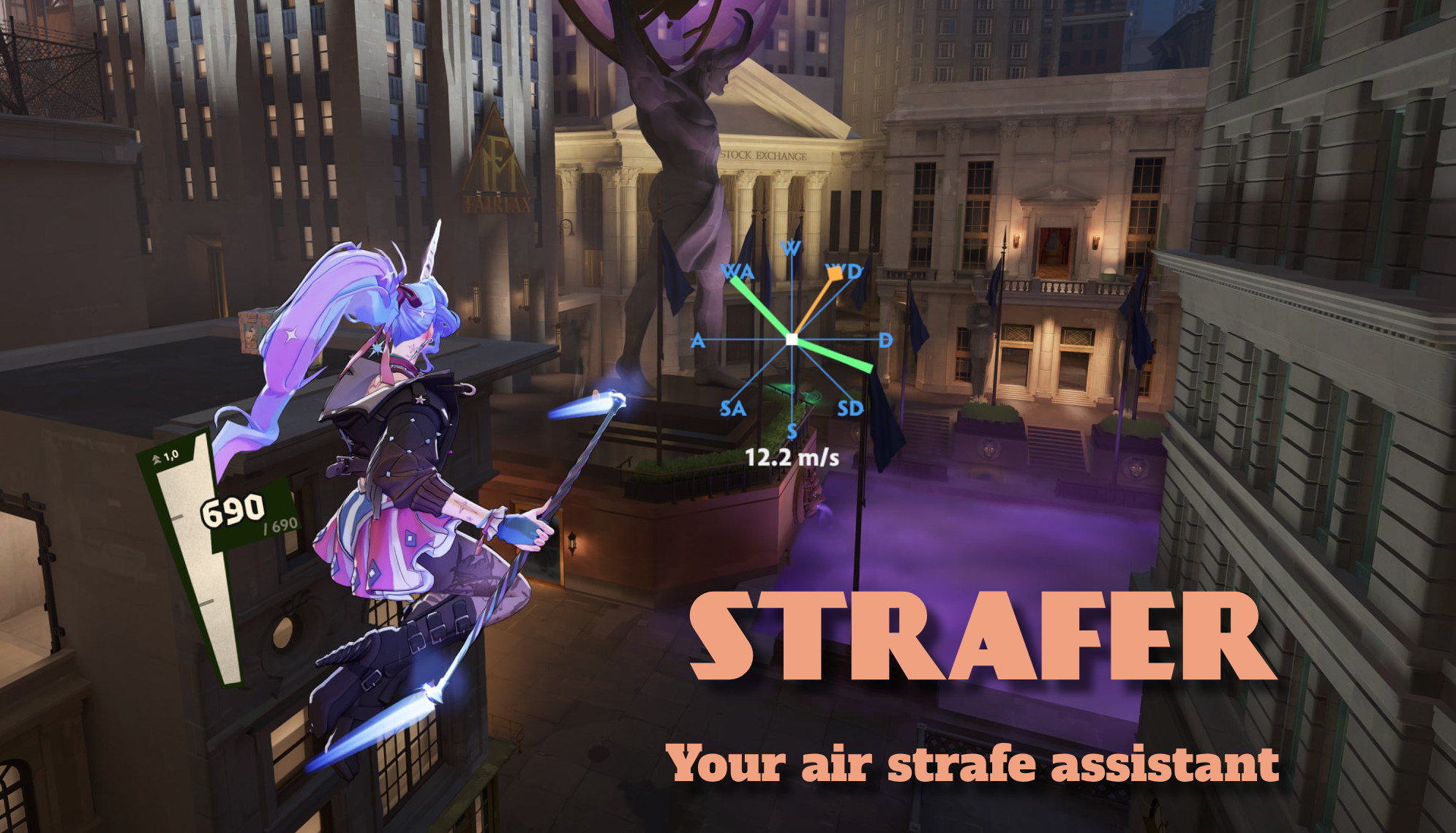
Strafer is a small HUD compass for learning and practicing air strafes in Deadlock.
How to read and use it
What makes it accurate
Settings (Escape menu > STRAFER): show/hide, speed under the compass, speed in game units (GU/s) or m/s (also switches the game's speedometer), opacity, size, wing width, colors of the movement needle and the wings, update rate (60 Hz, or 20 Hz if 60 causes problems), exact position (X/Y). Saved on your PC.
Compatibility
Install
Known issues
Changelog
Please, turn on in-game speedometer for the mod to work as intended. You also need to be on NYC map for the mod to work, as it uses your minimap.
Showcase video explains how to use it properly. Or hit me in DMs in Discord @tharin - I'll be happy to explain.
Strafer is a small HUD compass for learning and practicing air strafes in Deadlock.
How to read and use it
- The dial is your view: the top is where you look, the letters are key directions (W, WD, D, SD, ...).
- Orange needle: where your character model is actually moving.
- Green wings: the angle band where your key direction gains the most speed at your current speed. Turning right with W+D: without inputting any direction turn your camera so one of the green wings is aligned with WD blue ling, then press W and D buttons simultaneosly, keep pressing them and turn your camera in the direction that "spreads" the wing (if you've aligned it with the right wing - turn your camera to the right) - keep WD inside that wing. If you want to turn the other direction - first let go of WD, then realign your camera so that the other wing is aligned with WA for example, and only then press WA and start rotating camera the other way. The faster you go, the further the wings open. Experiment with all directions.
What makes it accurate
- Speed comes from the game's own speedometer: turn it on in Settings > Game > Interface > Speedometer (if it is off, Strafer falls back to a rougher estimate from the minimap).
- The wings follow a strafe model calibrated with in-game zero-gravity flights, including heroes and effects with more air control: Celeste's weapon, and Holliday's Bounce Pad (detected automatically when you are launched, also from an ally's pad, until you land).
Settings (Escape menu > STRAFER): show/hide, speed under the compass, speed in game units (GU/s) or m/s (also switches the game's speedometer), opacity, size, wing width, colors of the movement needle and the wings, update rate (60 Hz, or 20 Hz if 60 causes problems), exact position (X/Y). Saved on your PC.
Compatibility
- Works together with QOL Lock.
- Replaces panorama/layout/base_hud.xml, so it conflicts with other mods that replace the same file.
- HUD only: it reads what the HUD already shows (minimap, speedometer) and does not change gameplay.
Install
- Deadlock Mod Manager: one-click install from this page.
- Manual: copy pak21_dir.vpk into Deadlock\game\citadel\addons\ (rename it to a free pakNN_dir.vpk if the number is taken); game\citadel\gameinfo.gi must mount the addons folder, which mod managers do for you.
Known issues
- Holliday's Bounce Pad is detected with a workaround. A pad flight (your own pad or an ally's) gives much more air control until you land, so the best angle moves closer to the orange needle. The game does not show this buff in the HUD, and HUD mods cannot read your stats directly, so Strafer infers it from the speedometer: the pad sets your horizontal speed to around 750 GU/s (19 m/s) in a single tick, and a sharp speed drop (landing or hitting a wall) ends the flight. As a result:
- it only works with the game's speedometer turned on;
- a sudden slowdown in mid-air can end pad mode early, and another launch to the same speed could start it by mistake;
- using vents incorrectly activates Bounce Pad mode, and the addon starts working incorrectly until you lose speed by landing. Until I find a better way to spot Bounce Pad activation aside from looking at sudden speed change, that won't be fixed. Affects ONLY Holliday.
- the pad's wing angle is calculated from the game's air control values and checked on a handful of real flights, so it is less precise than the regular calibration. - Items and abilities that change air control are not taken into account (Majestic Leap, Seraphim Wings, Magic Carpet, some heroes' abilities). Most of these effects are hidden from the HUD, so Strafer cannot see them. While one is active, the best angle is closer to the orange needle than the wings show. I'm planning to fix it in the future updates.
- The game's speedometer sometimes gets stuck at 901 GU/s (22.9 m/s). This is a bug in the game itself, not in Strafer; switching heroes sometimes clears it. While it happens, the speed under the compass also stops at 901. The wings are only slightly affected: at that speed they are almost at 90° anyway.
- Settings are currently not saved between sessions. Sorry. That I'm going to fix in the nearest update.
Changelog
- 1.0.0: first release.
- 1.0.1: smoother wings that keep up with camera turns (new Camera prediction and Smooth wings options, ON by default) - smoother experience on lower speeds. Sadly, making it 100% smooth is very difficult, as we are tied to minimap and speedometer updates, which happen in 60hz. I'll try my best in the future; new Advanced tab with Update rate and these options (20 Hz is now a light mode without them).
Похожие моды
Интерфейс
DEADLOCK TOASTED
Интерфейс
Catlock: Kitty Hero Portraits
Интерфейс
Health Color
Интерфейс
Jumpscare Mod
Интерфейс
Mid and Bridge Buff Timer
Интерфейс
FG Healthbar Revamp
Интерфейс
MapList
Мод — работа автора, файлы и превью лежат на GameBanana, данные каталога — Deadlock Mod Manager. Автор хочет убрать мод отсюда — напиши нам, уберём. Контакты
Скин поменял — теперь ранг
Трекер бесплатно покажет, на каких героях ты теряешь очки. Не хочешь тратить сезон — посчитай буст.