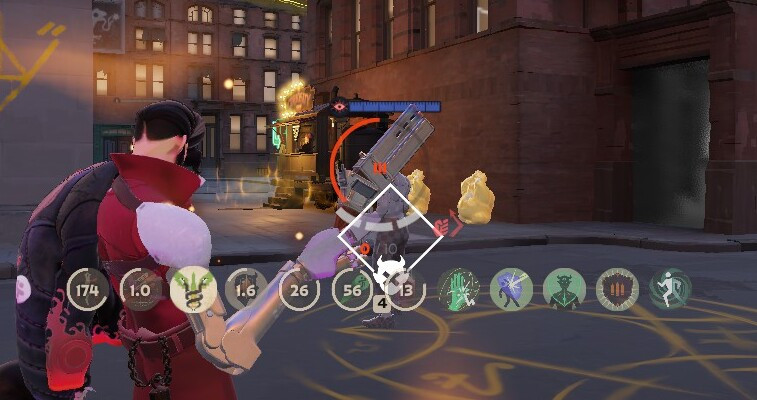
 Кадр 1 из 2
Удобство
Always Show Passive Items and Actives Icons
Автор: Hanturaya
- Загрузки
- 1 157 928
- Лайки
- 78
- Обновлён
- 20 октября 2026
Установить через Mod Manager
Страница на GameBananaОткроет Deadlock Mod Manager: он скачает файл с GameBanana и включит мод.
Нет приложения? Скачать Deadlock Mod Manager
Описание
От автора, на языке оригинала.
[Twitch] | [Support] | Thanks for checking out the
mod!
Always-visible Passive & Active ability icons. Know when your cooldowns are ready without looking away from the fight.
Custom Passive Builder: https://hantu-raya.github.io/custom-p assive/
How to use the builder:
1. Download
2. Open the builder and drop the .7z into the Template required window. Your browser checks the file and remembers it for 12 hours.
3. Pick a preset: Passive Only (pak04), Passive + Actives (pak03) or Passive + Actives (No Behavior) (pak05). The preset ticks the same items as the matching filter download.
4. Add or remove items from the shop tabs. The Selected tab shows everything you picked.
5. Click Build & Download. You get a .7z containing one VPK.
6. Extract that VPK into
Everything is built in your browser. Your files are never uploaded. Only the Popular tab contacts deadlock-api.com.
Layouts (pick one):
• Standalone: Classic centered HUD.
• Standalone + Ammo Buff Notifier: Classic centered HUD with the ammo notifier. Download
• Redesign Standalone: Circular, debuff-style passive icons above the health bar. Inspired by Soma.
• Redesign Standalone + Ammo Buff Notifier: Circular redesign with the ammo notifier. Download
Install only one layout. The Ammo Buff Notifier downloads already contain their matching Standalone layout.
Ammo Buff Notifier
The notifier shows when these temporary ammo buffs are active:
• Mercurial Magnum
• Split Shot
• Blood Tribute, including activation from any active-item slot
An item icon appears beside the current ammo count while its buff is active. Multiple buffs stack in activation order: the first activated icon stays on the left, and the newest icon appears closest to the ammo count.
The current ammo number also changes color for each buff and buff combination, making overlapping effects easier to distinguish.
Do not install the separate notifier or another Standalone layout on top of an Ammo Buff Notifier version.
Optional Filters (pick one):
•
•
•
Filters remove non-cooldown items such as Battle Vest, Enchanter's Emblem, and Fortitude.
Install:
⚠️ CRITICAL: When Deadlock patches or the filters update, stop using the mod and download the latest version. Outdated filter files can produce broken or incorrect item stats. Check for updates every 3–4 hours during patch windows.
Always-visible Passive & Active ability icons. Know when your cooldowns are ready without looking away from the fight.
Custom Passive Builder: https://hantu-raya.github.io/custom-p assive/
How to use the builder:
1. Download
templete from the template download. Do not extract it.2. Open the builder and drop the .7z into the Template required window. Your browser checks the file and remembers it for 12 hours.
3. Pick a preset: Passive Only (pak04), Passive + Actives (pak03) or Passive + Actives (No Behavior) (pak05). The preset ticks the same items as the matching filter download.
4. Add or remove items from the shop tabs. The Selected tab shows everything you picked.
5. Click Build & Download. You get a .7z containing one VPK.
6. Extract that VPK into
citadel/addons/, remove the matching filter VPK if you had it installed, and restart Deadlock.Everything is built in your browser. Your files are never uploaded. Only the Popular tab contacts deadlock-api.com.
Layouts (pick one):
• Standalone: Classic centered HUD.
• Standalone + Ammo Buff Notifier: Classic centered HUD with the ammo notifier. Download
standalone_ammo_notifier.• Redesign Standalone: Circular, debuff-style passive icons above the health bar. Inspired by Soma.
• Redesign Standalone + Ammo Buff Notifier: Circular redesign with the ammo notifier. Download
standalone_redesign_ammo_notifier.Install only one layout. The Ammo Buff Notifier downloads already contain their matching Standalone layout.
Ammo Buff Notifier
The notifier shows when these temporary ammo buffs are active:
• Mercurial Magnum
• Split Shot
• Blood Tribute, including activation from any active-item slot
An item icon appears beside the current ammo count while its buff is active. Multiple buffs stack in activation order: the first activated icon stays on the left, and the newest icon appears closest to the ammo count.
The current ammo number also changes color for each buff and buff combination, making overlapping effects easier to distinguish.
Do not install the separate notifier or another Standalone layout on top of an Ammo Buff Notifier version.
Optional Filters (pick one):
•
pak03_dir.vpk: Active icon mode, hides clutter, keeps item behavior.•
pak04_dir.vpk: Passive-only mode and hides clutter.•
pak05_dir.vpk: Active icon mode, hides clutter, and removes item behavior.
Filters remove non-cooldown items such as Battle Vest, Enchanter's Emblem, and Fortitude.
Install:
- Extract one layout into
citadel/addons/. - Optionally install one filter VPK.
- Remove older or conflicting Standalone and notifier VPKs.
- Restart Deadlock after replacing any VPK.
⚠️ CRITICAL: When Deadlock patches or the filters update, stop using the mod and download the latest version. Outdated filter files can produce broken or incorrect item stats. Check for updates every 3–4 hours during patch windows.
Похожие моды
Удобство
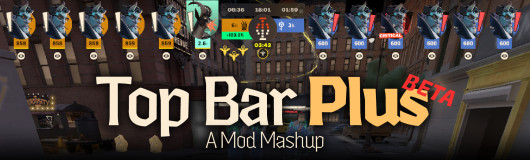
[UPDATED] Top Bar Plus
Удобство · Nurse Harrow
OptiLock FPS Configs (Nurse Harrow Fix!)
Удобство
Show Rank / Lane missing warning
Мод — работа автора, файлы и превью лежат на GameBanana, данные каталога — Deadlock Mod Manager. Автор хочет убрать мод отсюда — напиши нам, уберём. Контакты
Скин поменял — теперь ранг
Трекер бесплатно покажет, на каких героях ты теряешь очки. Не хочешь тратить сезон — посчитай буст.